How It Works #
- Candidate is shown their existing contact details.
- Candidate reviews the information.
- Candidate confirms the details are correct.
- Journey continues to the next Step.
How to Configure #
- Open your Agent in the Agent Editor.
- Go to Path Steps. Choose contact details confirmation
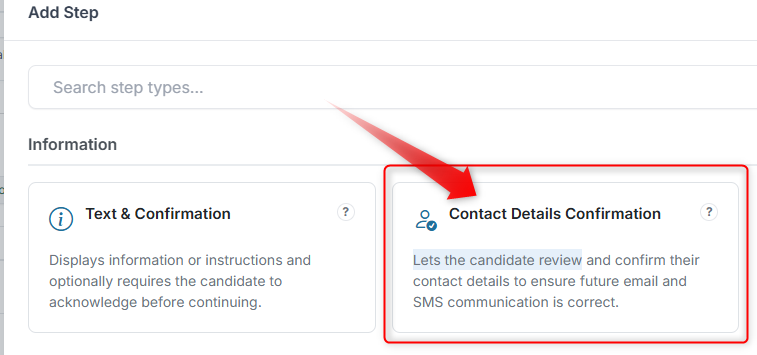
- Click Configure on a Contact Details Confirmation Step.
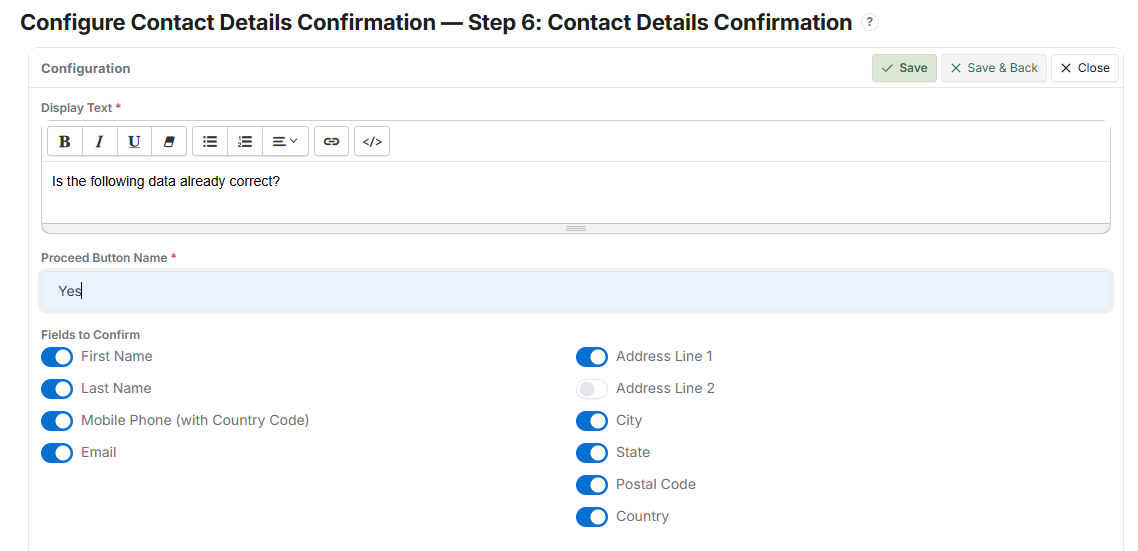
- Enter your Display Text (e.g., "Is the following data correct?").
- Set the Proceed Button Name (e.g., Yes, Confirm).
- Select the Fields to Confirm (e.g., Name, Email, Phone).
- Click Save.
What the Candidate Sees #
- A message asking them to confirm their details
- A list of pre-filled contact fields
- A button to confirm and continue
This Step ensures the Candidate verifies their information before proceeding.
Tips #
- Only include fields that are important to confirm
- Keep the message clear and direct
- Use this Step before critical actions (e.g., submission or communication)