What is Zirpa? #
Zirpa is a platform that guides people through complex journeys automatically.
At the center of Zirpa are intelligent Agents that guide Candidates, customers, and leads through structured processes from start to finish. Zirpa moves each Journey forward Step by Step until a clear Outcome is reached.
How It Works #
Zirpa runs Journeys using a structured system designed for consistency and control:
- A Gate receives incoming data and starts the Journey
- The Candidate is placed onto a Path
- The Path defines the sequence of Steps
- The Agent guides the Candidate through each Step
- Milestones mark key progress points (see Using Milestone)
- An Outcome defines how the Journey ends
Throughout the Journey, the Agent presents information, collects responses, answers questions, and records progress, while your team maintains full visibility and control.
Key Idea #
Most systems track what has already happened. Zirpa focuses on what should happen next.
- Journeys start cleanly through a Gate
- Progress happens automatically via the Runner
- Candidates are guided at every Step
- Decisions are structured and controlled
- Every Journey ends with a clear Outcome
This creates a system where Journeys move forward consistently without relying on manual follow-ups or fragmented communication.
Candidate #
A Candidate is the person moving through a Zirpa Journey.
This can be a job applicant, customer, lead, or any individual going through a structured process guided by a Zirpa Agent. Each Candidate enters a Journey through a Gate and is placed onto a Path, where the Agent guides them through a series of Steps.
Throughout the Journey, the Candidate interacts with the Agent to receive instructions, answer questions, submit information, and complete required actions.
What Defines a Candidate #
Each Candidate has a structured record that includes:
- Their current position in the Journey
- Completed and pending Steps
- Responses, documents, and collected data
- A Journey Timeline showing all activity
- Progress toward defined Outcomes
This record updates automatically as the Candidate moves through the Journey. For a detailed breakdown, see Understanding the Candidate Record.
How the Candidate Experience Works #
From the Candidate's perspective:
- They access the Journey through a link or entry point
- The Agent guides them through each Step
- They complete actions such as answering questions or uploading documents
- They can ask questions using Chat with Agent
- The Journey progresses as each Step is completed
The process continues until the Journey reaches an Outcome.
Step #
A Step is a single action point in a Journey.
Each Step defines a specific action performed by the Zirpa Agent as a Candidate moves through a Path. Steps are the building blocks of a Journey and determine how the process progresses from one stage to the next.
What Happens in a Step #
Depending on the Step type, the Agent may:
- Present information or instructions
- Ask questions and collect responses
- Request document uploads
- Trigger integrations or webhooks
- Pause the Journey for review
- Require approvals or confirmations
Each Step is configured individually to control how the interaction behaves. For the full list of Step types, see the Steps Configuration Guide.
How Steps Move the Journey Forward #
As a Candidate completes a Step:
- Their responses are recorded
- The system updates their progress
- The Runner triggers the next Step automatically
Steps ensure that the Journey progresses in a structured and consistent way.
Where Steps Fit #
Steps exist within a Path, which defines the order in which they are executed. Each Step controls what happens at a specific point, while the Path controls how those Steps are arranged.
Path #
A Path is the ordered sequence of Steps that defines the structure of a Journey.
It determines what happens, in what order, from start to finish. Each Path is designed by your team and used by the Zirpa Agent to guide Candidates through a consistent process.
What a Path Controls #
A Path defines:
- The sequence of Steps
- Where decisions or reviews occur
- How the Journey progresses from start to finish
The Path acts as the blueprint for how a Journey is structured.
How a Path Works #
When a Candidate enters a Journey:
- They are placed onto a Path through a Gate
- The Agent follows the Path Step by Step
- Each Step is executed in the defined order
- The Journey continues until an Outcome is reached
The Path ensures that every Candidate follows a consistent and controlled flow.
Journey #
A Journey is the live, real-time execution of a Path for a specific Candidate.
While a Path defines the structure, a Journey represents the actual progression of a specific Candidate. Each Candidate has their own Journey.
What Happens in a Journey #
As a Candidate moves through a Journey:
- They progress through Steps defined in the Path
- Their responses and actions are recorded
- The Agent guides them at each stage
- Their current position is continuously updated
The Journey reflects what is actively happening, not how the process was designed.
How a Journey Works #
When a Candidate enters through a Gate:
- A new Journey is created for that Candidate
- The Candidate is placed onto a Path
- The Agent begins guiding them through each Step
- Progress continues until an Outcome is reached
Each Journey runs independently, even if multiple Candidates are on the same Path.
How Journey Relates to Path and Step #
ConceptRolePathDefines the structureStepDefines what happens at each pointJourneyThe real-time execution of both
The same Path can be used by many Candidates, but each has their own Journey based on their progress and responses.
Agent #
An Agent is the intelligent guide that runs a Journey from start to finish.
It interacts directly with the Candidate, guiding them through each Step, collecting responses, and ensuring the Journey progresses as designed. Each Agent is configured by your team and operates consistently for every Candidate on the same Path.
What an Agent Does #
An Agent is responsible for:
- Guiding Candidates through a structured Journey
- Presenting information and instructions
- Asking questions and collecting responses
- Triggering actions such as integrations or notifications
- Recording progress and activity
- Answering questions through Chat with Agent
The Agent ensures that each Candidate receives a consistent and complete experience.
How an Agent Works #
Once a Candidate enters a Journey:
- The Agent follows the defined Path
- Executes each Step in sequence
- Interacts with the Candidate at each stage
- Responds based on configured knowledge and context
The Agent operates continuously, allowing the Journey to progress without requiring manual intervention at every Step.
> Note: The Agent handles Candidate-facing interactions. The Runner handles background execution such as applying logic, triggering conditions, and moving the Journey forward. See Runner below.
Gate #
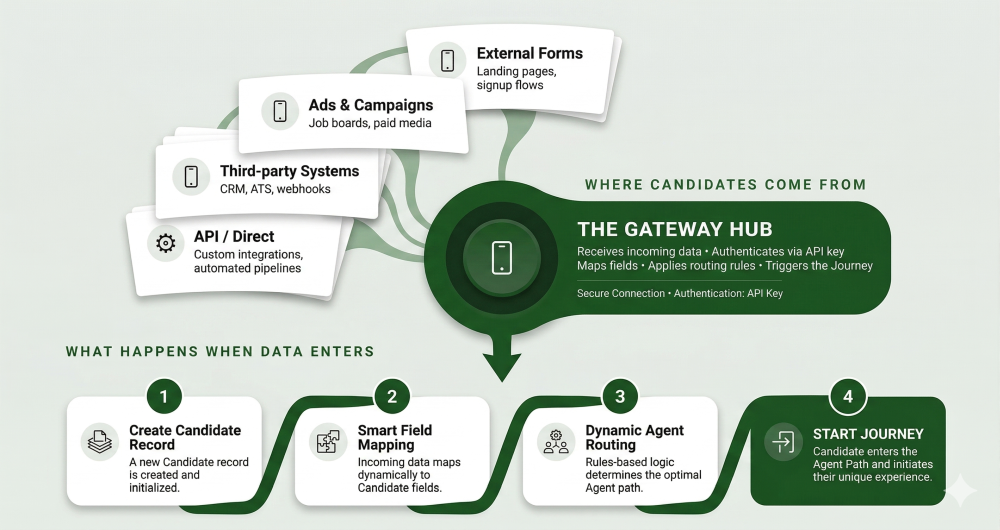
A Gate is the entry point into a Journey.
It receives incoming data and places a Candidate onto a Path, starting the Journey in a structured and controlled way. Gates ensure that every Journey begins with the correct information and context.
What a Gate Does #
A Gate is responsible for:
- Receiving incoming data from external or internal sources
- Creating a new Candidate or loading an existing one
- Assigning the Candidate to the correct Path
- Starting the Journey
For setup instructions, see How to Create a Gate.
Where Data Comes From #
Gates can receive data from different sources, including:
- Website forms
- CRM integrations
- Marketing lead capture
- Referral systems
- API or webhook integrations
- Internal system triggers
This allows Journeys to start automatically based on real events.
Outcome #
An Outcome defines how a Journey ends.
It represents the final state reached after a Candidate completes the Path. Each Outcome provides a clear and controlled result for the Journey.
What an Outcome Does #
An Outcome is used to:
- Define the final status of a Journey
- Indicate the result of a process
- Trigger actions such as notifications or integrations
- Ensure every Journey ends in a clear state
Examples of Outcomes #
Common Outcomes include:
- Approved
- Declined
- Withdrawn
- Completed
The available Outcomes depend on how the Path is designed.
How Outcomes Work #
As a Journey progresses:
- The Candidate moves through Steps
- Decisions or conditions determine the final result
- The Journey reaches an Outcome
An Outcome can be triggered automatically based on logic, or manually by your team.
Runner #
The Runner is the background engine that executes Steps and applies logic.
It operates behind the scenes to ensure that each Step is triggered, conditions are evaluated, and the Journey progresses as designed. The Runner is distinct from the Agent: while the Agent handles Candidate-facing interactions, the Runner handles system-level execution.
What the Runner Does #
The Runner is responsible for:
- Executing Steps in the correct order
- Applying logic and conditions (such as Navigation Rules)
- Triggering actions such as integrations or notifications
- Updating Candidate progress
The Runner ensures that the Journey runs consistently without manual intervention.
How the Runner Works #
As a Candidate moves through a Journey:
- The Runner monitors their progress
- Triggers the next Step when conditions are met
- Applies any rules or logic defined in the Path
- Keeps the Journey moving forward automatically
The Runner operates continuously, allowing multiple Journeys to run at the same time.
Compatibility Match #
Compatibility Match evaluates how well a Candidate fits specific criteria.
It uses defined signals and rules to assess suitability, helping guide decisions within a Journey.
What Compatibility Match Does #
Compatibility Match is used to:
- Evaluate Candidate fit based on responses or data
- Support decision-making during a Journey
- Help route Candidates to the appropriate Path or Outcome
- Create consistency in how Candidates are assessed
It provides a structured way to compare Candidates against defined requirements. For configuration details, see Compatibility Match.
How Compatibility Match Works #
As a Candidate progresses through a Journey:
- Relevant data is collected through Steps
- Defined criteria are applied to that data
- A match level or score is determined
- The result can influence routing, decisions, or Outcomes
Compatibility Match can be used at different points in the Journey depending on how the Path is designed.
Journey Timeline #
The Journey Timeline is a chronological audit trail of everything that happens during a Candidate's Journey.
It provides a time-ordered view of actions, progress, and events from start to finish.
What the Journey Timeline Shows #
The Journey Timeline includes:
- Steps completed and in progress
- Candidate responses and submitted data
- Agent interactions and messages
- Status changes and decisions
- Key events such as entry and completion
It provides full visibility into how a Journey has progressed.
How the Journey Timeline Works #
As a Candidate moves through a Journey:
- Each action is recorded in sequence
- Updates are added in real time
- Progress can be tracked at any moment
The Journey Timeline is continuously updated as the Journey progresses. For a detailed walkthrough, see Understanding the Journey Timeline.
Why the Journey Timeline Matters #
The Journey Timeline helps teams:
- Understand what has happened at each stage
- Review decisions and Outcomes
- Troubleshoot issues or delays
- Maintain a clear audit trail
Merge Fields #
Merge Fields are dynamic variables that personalise content with Candidate data.
They act as placeholders in messages, forms, and other content. When the content is displayed or sent, the system replaces each Merge Field with the corresponding real data.
For usage instructions and the full list of available fields, see Using Merge Fields.
Brand and Account #
A Brand represents a distinct business identity within your Zirpa account. Each Agent belongs to a specific Brand, and Candidates are assigned to a Brand when they enter a Journey.
An Account is the top-level container that holds one or more Brands, along with users and platform settings.
For details on how Brands and Accounts are structured, see Brand vs Account Structure.
How These Concepts Work Together #
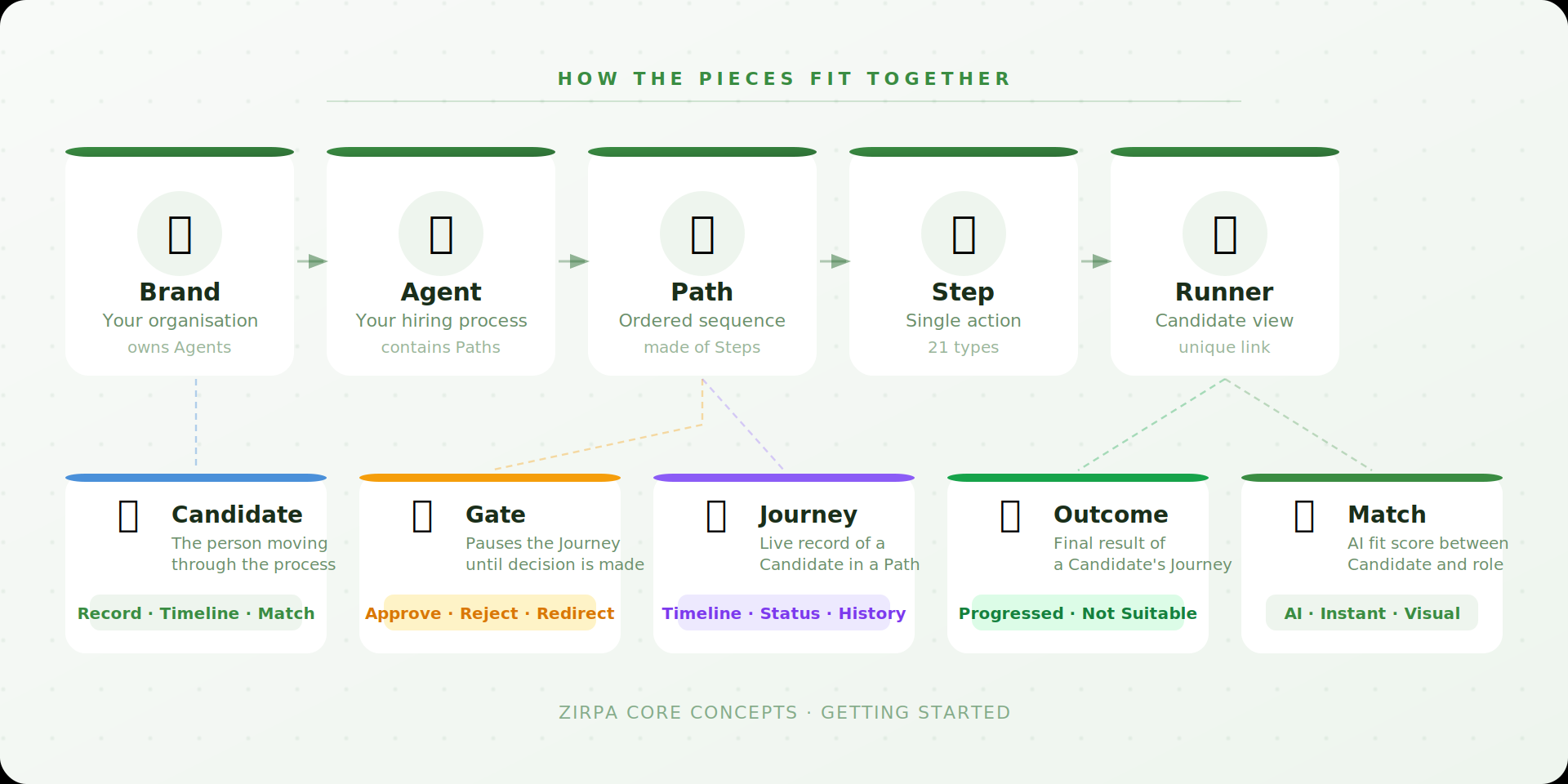
Zirpa is built from a set of connected concepts that work together to guide each Journey from start to finish.
- A Candidate enters through a Gate
- A Journey is created for that Candidate
- The Journey follows a Path
- The Path is made up of Steps
- The Agent guides the Candidate through each Step
- The Runner executes the process in the background
- Compatibility Match evaluates Candidate fit at defined points
- Merge Fields personalise content with real data
- The Journey Timeline records everything that happens
- The Journey ends with a defined Outcome
Together, these components create a structured, consistent, and automated experience.