Overview #
The Agent Comparison report provides a side-by-side comparison of all Agents based on key performance indicators such as Candidate volume, completion rate, and Journey efficiency. This report helps you quickly identify which Agents are performing well and which may require optimisation.
What You Can See #
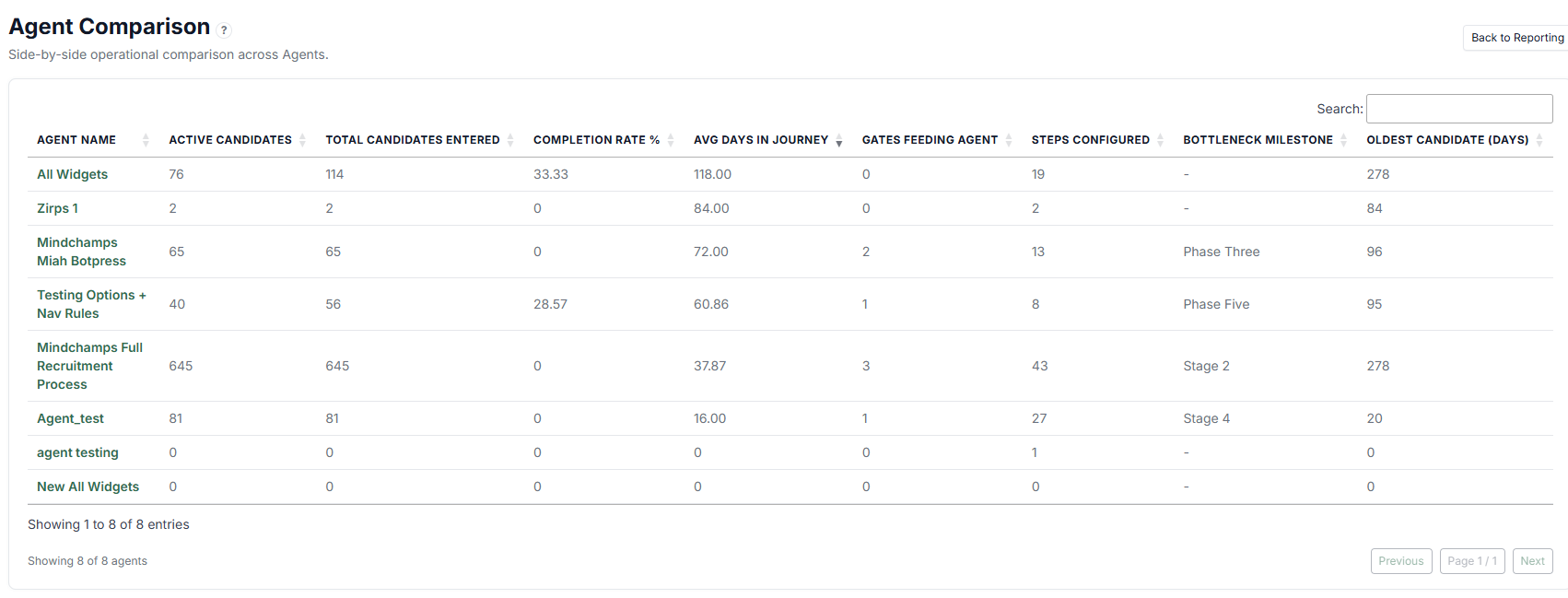 Each row represents an Agent, with the following metrics:
-
Agent Name — Name of the Agent
-
Active Candidates — Number of Candidates currently in progress
-
Total Candidates Entered — Total number of Candidates who have entered the Journey
-
Completion Rate % — Percentage of Candidates who completed the Journey
-
Avg Days in Journey — Average time Candidates spend in the Journey
-
Gates Feeding Agent — Number of entry points (sources) feeding into the Agent
-
Steps Configured — Total Steps configured in the Agent Journey
-
Bottleneck Milestone — The stage where Candidates tend to get delayed the most
-
Oldest Candidate (Days) — The longest time a Candidate has spent in the Journey
Interactive Behaviour #
Clicking on an Agent Name will open the Agent Efficiency report for that specific Agent. This allows you to drill down from a high-level comparison into detailed performance analysis.
How to Use Agent Comparison #
Use this report to:
-
Compare performance across multiple Agents
-
Identify high-performing vs underperforming Agents
-
Detect bottlenecks at a glance
-
Evaluate completion rates and Journey duration
-
Decide which Agents need optimisation
Use Cases #
-
Identify which Agent converts Candidates best
-
Compare Journey efficiency between different workflows
-
Monitor operational performance across teams
-
Quickly spot Agents with delays or stuck Candidates
Tips #
-
Focus on Completion Rate and Avg Days together for better insight
-
Check Bottleneck Milestone to identify problem areas
-
Click into Agent Efficiency for deeper investigation
-
Watch for Agents with high Oldest Candidate (Days) as potential risks