Overview #
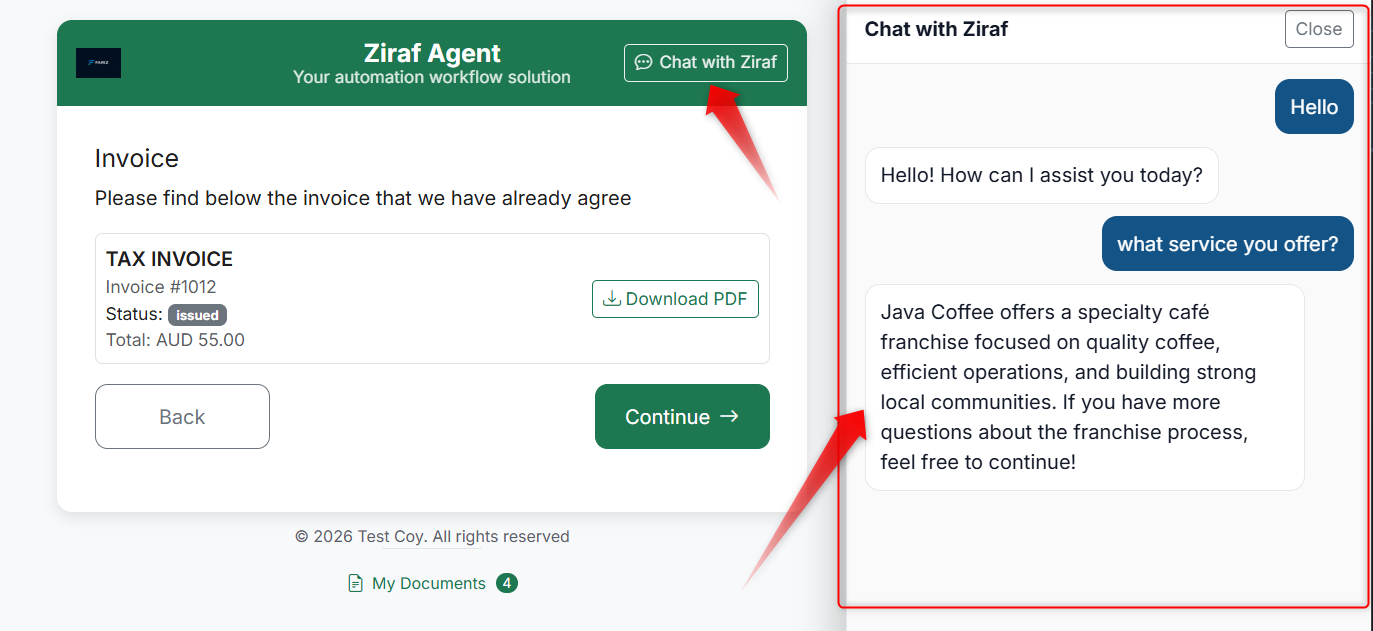
Agent Chat controls how the chat feature looks and behaves in the Runner — the interface where Candidates experience the Journey. When enabled, Candidates can ask questions and receive instant answers.
Why Agent Chat Matters #
- Gives Candidates help without leaving the Journey
- Reduces confusion and drop-off
- Keeps the experience natural and supportive
What You Can Configure #
Chat Button Label #
This is the text shown on the chat button in the Runner (e.g., "Need help?", "Ask a question").
- Keep it short and action-oriented
- Make it clear that help is available
Visual Style #
The chat interface should match your Brand's look and feel. Colours and styling are controlled through Agent Appearance.
Chat Behaviour #
You can control:
- Whether the chat is always available or only at specific Steps
- What types of questions the Agent can answer (based on assigned Knowledge)
- Whether the chat is a support tool or a decision-making tool
Best Practices #
- Use clear button labels — "Need help?" is better than "Chat"
- Keep it supportive — Chat should help the Candidate complete the current Step, not distract them
- Keep responses focused — Avoid giving overly long or generic answers
- Review chat usage regularly — Common questions may indicate that your Step instructions need improvement
What the Candidate Sees #
- A chat button in the Runner interface
- A chat window where they can type questions
- Instant responses based on your configured Knowledge
Common Mistakes #
- Using vague chat button labels (e.g., just "Click here")
- Making the chat greeting too long
- Inconsistent chat behaviour across different Agents
- Not reviewing what Candidates are actually asking